

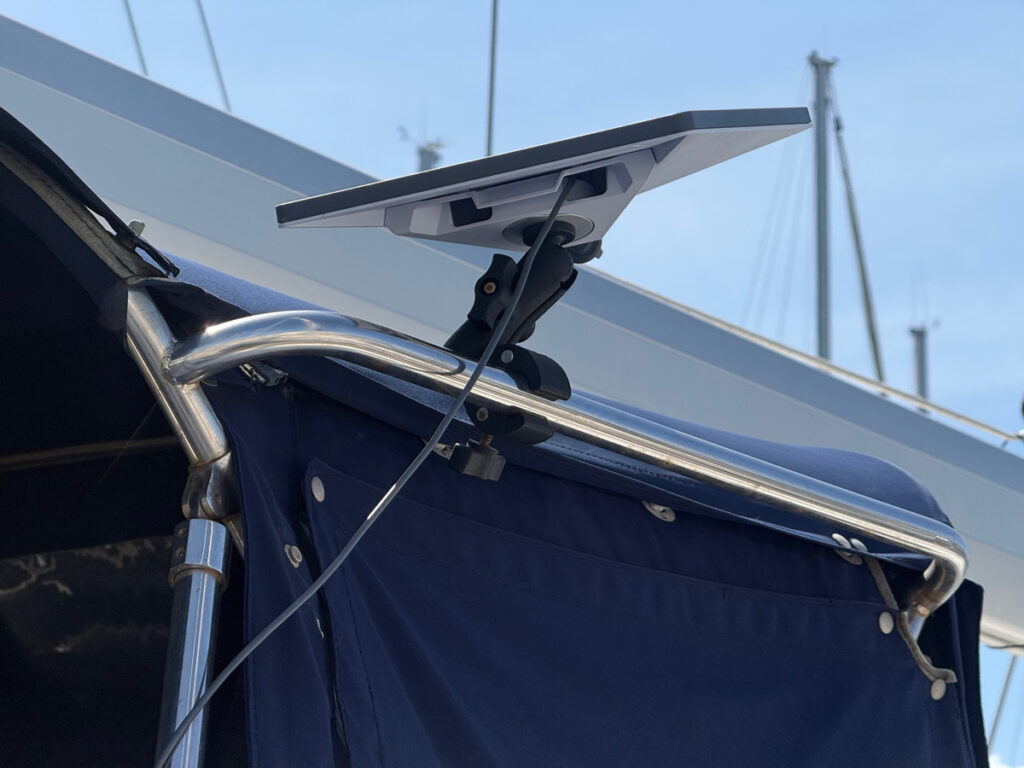
Starlink, Elon Musk’s space-age internet solution, has revolutionized how we stay connected without selling our souls for spotty marina Wi-Fi or chasing remote cell towers. Cruisers don’t need to hoist their cell phones up the mast to coax a dodgy hotspot from a distant cell tower anymore. Elon has us covered. When we left Vancouver over ten years ago, the very idea of Starlink was science fiction, and now it’s become part of our daily cruising experience. Aboard Avant we have used the Standard Gen 2 (articulated) and Mini dishes (we snagged a Mini at the introductory price of $200USD in Panama) and have some thoughts on what works best (at least for us).
First, an ‘old salt’ tech history review.
Starlink vs. the Establishment: Ditching Dinosaur Tech for Space Magic
Before Starlink reset the bar, cruisers relied on systems like Inmarsat, Iridium, and SSB (Single Sideband) radio for staying connected. These traditional technologies got the job done, but in the way a telegram beats smoke signals: barely. Let’s break down how Starlink leaves them in its wake, and take a peek at the phased array antenna wizardry inside each dish.
First up, Inmarsat: This geostationary satellite system (GEO) hovers way up at 22,000 miles, beaming signals with latency that will make you nostalgic for dial-up — think 500-700ms pings, okay for voice calls or slow data but not for video chats (at least without feeling like you’re living in a badly dubbed movie). It’s reliable for maritime pros, with global coverage minus the poles, but hardware and airtime costs an arm and a leg. Typically used on only the largest boats, as its power requirements are huge.
Iridium: Another LEO (Low Earth Orbit) contender with 66 satellites zipping around, nails pole-to-pole coverage and shines in storms where Starlink might stutter (thanks to its lower frequency L-band vs. Starlink’s Ku-band). But speeds? A sluggish 2.4-700kbps for data, suited for emails, texts, weather reports, and SOS calls, not Netflix marathons. It’s bombproof for safety, with units often having long-life internal batteries, virtually no power draw and no need for a clear sky view like Starlink, but you’ll pay a premium for that reliability — think $1-2 per minute for calls. We have an Iridium-based Garmin inReach aboard Avant we use for 24/7 tracking, emergency two-way use, SMS messages and as a general communications backup. An Iridium-based system can go with you in a life raft, a Starlink not so much. Starlink is for living, Iridium is for surviving.
And SSB? Ah, the granddaddy of them all — just high-frequency radio bouncing off the ionosphere for long-range voice, email, or weather faxes. Free airtime after the initial gear cost (around $2k-5k), but speeds are glacial (think 2.4kbps email), and it requires a ham license, antenna tuning, and patience for dealing with propagation whims. Great for traditional radio nets or emergencies, but forget streaming — it’s like using a carrier pigeon in the jet age. We see lots of SSB rigs for sale cheap as owners move up the tech tree and NOAA discontinues SSB delivered services. (That said, we have a small SSB receive-only radio aboard Avant for listening to time ticks, weather forecasts and receiving weather faxes. We used it to listen to radio nets years ago in cell service free areas, and it will be with us a while longer.)
Starlink’s low latency broadband service leaves all previous generations of technology far behind. Hundreds if not thousands of times faster, it’s a brave new world. Cruisers describe it as a ‘game-changer.’
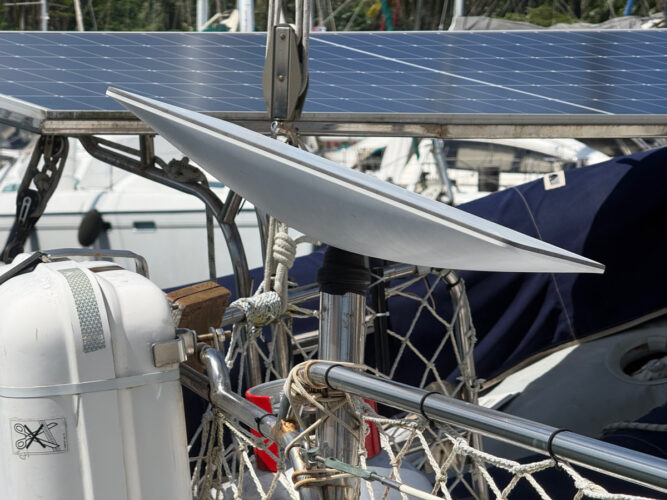
A Starlink using the classic pole stuck in a fishing rod holder mount.
What makes Starlink’s dishes so snazzy? Phased array antenna technology coupled with the number of satellites in the system (Starlink has over 9,600 in orbit as of February 2026). The hundreds of tiny antenna elements in the dish work in concert to steer beams electronically, with no moving parts (except in older models). The Mini packs ~590 elements into its compact frame for portability and low power consumption. The Standard ups the ante with ~1,500 elements for better throughput. And the High Performance? It boasts even more — some ~2,400 elements — for superior signal in rough seas or bad weather, justifying its higher price. More elements mean tighter beams, less interference, and Ferrari-like performance, but at the cost of a higher power draw. As any radio geek will tell you, the antenna is the key to high performance in any radio rig.
Plans for the three dishes are the same price. The plans just work better on the more expensive dishes.
In short, if previous tech was a dinghy with a broken oar, Starlink’s a jetpack — faster, cheaper (flat $100-165/month unlimited high speed Roam plans depending on your home country), but keep an Iridium handy for when the waves get rowdy, and an SSB if you want to keep in touch with your cruising forbearers’ way of life.
Dish Decisions: Size Matters, But So Does Your Battery Life
When it comes to Starlink dishes, it’s like choosing between a cruiser and a day sailor — both get you places, but one won’t sink your power reserves. Starlink currently offers several options: the Standard (aka V4 or Gen 3), the High Performance, and the pint-sized Mini.
The Standard is the workhorse for home or semi-fixed setups, using 40-100 watts while delivering speeds up to 220 Mbps (or more) download. It’s bigger, bulkier, and acts like that one crew member who insists on leaving the lights on and the fridge open — great for performance, but not ideal for a boat with a limited solar and battery setup (which describes Avant to a ‘t’).
Then there’s the High Performance dish, the overachiever of the bunch, sucking down 110+ watts for top-tier speeds (up to 400+ Mbps) and better weather resistance. Perfect if you’re captaining a catamaran with a terawatt solar array and don’t mind the power draw, but for us mere mortals with skimpy solar arrays, it’s like bringing a Ferrari to a wheelbarrow race.
Enter the hero of our story: the Starlink Mini. The smallest of the bunch is portable, compact, and sips power like a polite guest at happy hour — just 20-40 watts on average (on Avant, we typically see 18-22 watts). That’s half (or less) than the Standard, making it a no-brainer for boats where every amp-hour counts. Speeds supposedly top out around 100 Mbps, but we regularly see 170-220 Mbps here in Panama. Either speed is plenty for streaming or Zoom calls. Plus, it’s easier to mount without turning your deck into a satellite dish display stand. Sure, it’s not as speedy as its bigger siblings, but for us, low power requirement trumps raw download power.
If you’re powering off of a few solar panels and a modest battery bank, the Mini’s low draw means you can enjoy twice the time on the internet for the same power draw as the standard.
The Not-So-Smooth Sailing: Boat Motion and Weather Woes
Starlink isn’t perfect — shocker, right? Boats rock, roll, and pitch, and weather doesn’t always play nice. The biggest culprit? Movement.
When the platform supporting your Starlink is in motion, the fancy beam focussing antenna will struggle to get a ‘lock’ on a satellite, making establishing and maintaining a connection a real issue. A secondary problem is obstructions from masts, rigging, canvas, or the boat’s own superstructures blocking the dish’s view of the sky. Even small ones (2-3% of the field of view) can cause signal drops, especially underway when the boat’s motion swings things around. Waves can momentarily swing a part of the rig in to block line-of-sight, leading to brief interruptions — think your Zoom call freezing mid-sentence or Netflix buffering like it’s 1999.
It’s even worse when you’re trying to get online initially. Users at sea report difficulties getting Starlinks, particularly Minis, to initialize and establish their place on the network, especially in smaller boats and lively seas. Larger boats and catamarans are more stable platforms and make it easier for a Starlink to lock onto a satellite.
Then there’s weather: Tropical downpours, thick fog, heavy low clouds or storms degrade the Ku-band signal, causing temporary outages and/or slower speeds. It’s not as bad as old satellite systems (thanks to LEO proximity), but in a real howler, expect hiccups — service might drop for minutes or until the squall passes. Aboard Avant we find this particularly annoying, as we really do want to curl up with a nice stable internet connection below decks when the weather turns nasty and life on deck isn’t what we came out for. The dishes are tough (all are IP67-rated and designed to handle hurricane winds), but bad conditions will test the connection.
The High Performance dish shines here with its wider field of view and more elements, handling motion better and maintaining connections in rougher seas or marginal weather. The Standard does okay but drops more in motion-heavy or bad weather scenarios. The Mini? It’s compact and low-power, but its smaller array means it’s more sensitive to weather, obstructions and rocking — great for anchorages, but not a champ in big seas.
Pro tip: Mount high and clear (and closer to the boat’s centre of motion to limit the high seas watusi) and use the app’s obstruction scanner religiously. Many boaters keep an Iridium based device as backup for critical stuff — because when Mother Nature throws a tantrum, Starlink’s space internet sulks.
f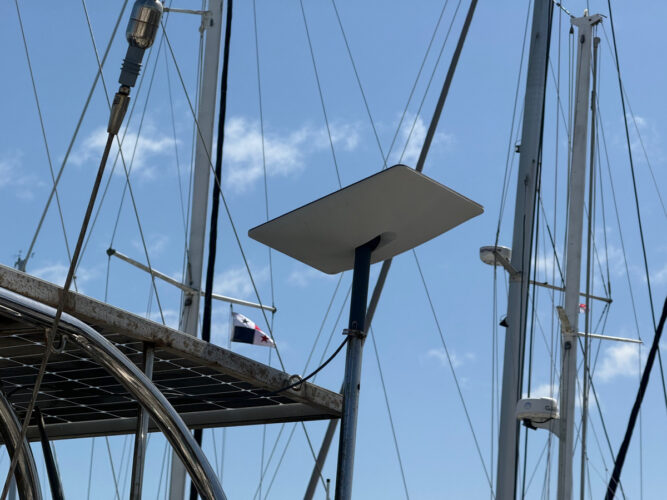
Global Roaming: the Fine Print for Wanderers
While Starlink is a global service, the subscription model is not. Starlink’s service is tied to the country where your hardware was purchased and initially registered. In most cases, users cannot freely change their home country just by updating their profile or service address online. The ability to switch countries is restricted by Starlink’s policies and local regulations and is not supported for all accounts or regions. Unless you’re on the pricey global roaming plan, you can only roam outside your home country for 60 days before your account is restricted.
For a global company the process of changing your country of residence is astonishingly Byzantine. If you move to a new country as you cruise over the 60 day limit, or plan to use Starlink long-term outside your registered home country, you generally must either purchase new hardware in that market or close down your existing account, remove the hardware from that account, do a factory reset on the equipment and reinitialize the hardware on a new Starlink account (under a new email and address) you set up in your new ‘home country’. In effect you’re selling it to yourself over the national border. In some cases this can trigger additional fees like the “Outside Region Fee.” Timing can make a difference, too. Different countries have different fees, so switching early can save the cruising kitty a few bucks. If you’re in a marina in your ‘home country‘ for a while, you can temporarily switch to a residential plan, which is usually cheaper than a roaming plan. Always check with Starlink’s national web pages for the country before making any plans to relocate your service internationally.
Setting Sail with Starlink: Installation Tips for the Technically Challenged
Installing Starlink on a boat isn’t rocket science (wait, actually, maybe it kind of is, since it involves satellites). The key is a clear view of the northern sky (or southern, depending on your hemisphere—check the app for instructions and obstructions). Mount your dish to avoid masts, sails, or that oversized fishing rod holder from blocking the signal. For the Mini, a pole mount or flat bracket on the stern arch works wonders, keeping it stable even when the waves decide to tango. On Avant we use a cheap articulated mount we bought on Amazon for about $12, and move the dish around to get the best sky view (see featured photo). In marinas or at anchor, we often use the ‘gravity mount’ (the kickstand mount it came with) laid on deck. Pro tip: Use a tilt-adjustable mount to optimize the angle, like fine-tuning your sails for that extra half knot of boat speed.
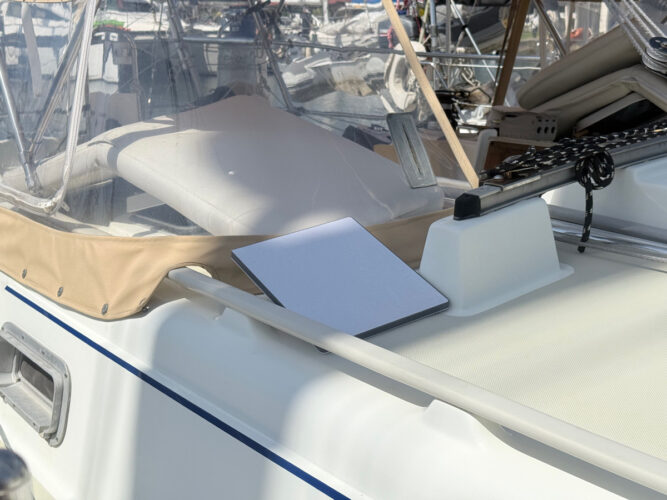
A Starlink mini using the ‘gravity mount’ on deck.
Secure everything, waterproof route cables to prevent water ingress, and consider a marine-grade enclosure if you’re paranoid about salt spray turning your tech into a pricey paperweight. Once mounted, fire up the Starlink app, connect to the Roam plan (essential for mobile use), and voilà — you’re online faster than you can say “bring me that horizon!” Instead of using the supplied 120/240V power adapter and an inverter, there are various means to gain a more efficient connection to your battery bank for each Starlink dish, eschewing the inverter losses. I’ll describe how we wired our mini below.
Wiring Wizardry: Powering Up a mini with a Victron Orion Tr
Now, the fun part: wiring. Because nothing says “relaxing boat life” like fiddling with wiring. Most boats run on 12V DC systems, but Starlink’s Mini craves higher voltages for optimal performance. That’s where the Victron Orion Tr 12 | 24 – 5 DC-DC converter shines — it steps up your boat’s 12V battery to 18-30V at 5 amps, perfect for feeding the Mini. The Mini’s power cord as shipped isn’t for 12V, it’s for 30V. Trying to use the supplied cord with 12V is an exercise in frustration.
While you can use a low cost 12-24V ‘buck converter’ as a power step up, the Orion is better for a few reasons. Most buck converters are mystery brand, and their useful life is unknown. Victron is a known quantity and has a reputation for reliability. Some buck converters are ‘buzzy’ and can interfere with the Starlink or other gear on board. The Orion is silent on that front. The Orion is also set up with a remote switch wiring point, making it easy to set up an on/off switch in a convenient place for cycling the mini on and off when you use it. It also matches your other Victron blue boxes, upping your style game.
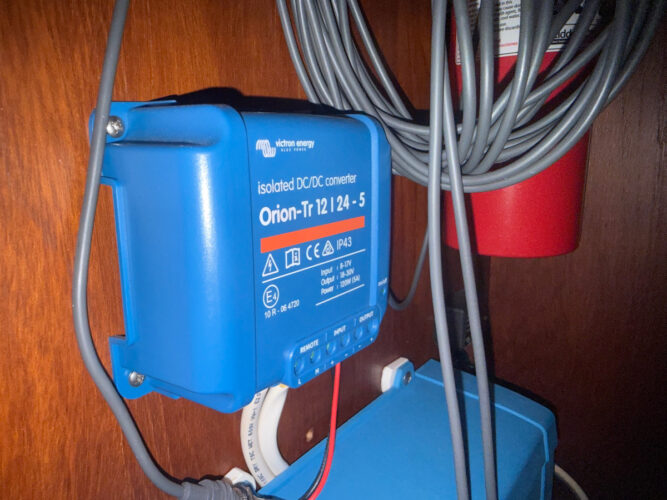
Our Orion-Tr 12|24-5 power converter.
Here’s the step-by-step. Start by connecting the Orion’s 12V input to your boat’s positive bus bar via a fuse (5-10A recommended to protect against shorts). Now wire the negative. Wire the output to a 2.1 mm female DC adapter or direct Starlink connector. Now, the remote switch magic: The Orion has remote on/off terminal capability. Remove the factory jumper and wire in a simple 12V switch you can locate anywhere convenient (any marine toggle will do). This lets you kill power to the system at night or when not in use, saving precious electrons — because who wants Starlink sucking up your limited amp-hours while you’re asleep? Total draw? With the Mini, you’re looking at minimal impact, keeping your solar setup happy and your fridge cold. Our mini runs at 19W lately (down from ~22W a month ago, thanks Starlink wonks!), which is about 0.7 amps at 30V. If wiring it up sounds scarier than a squall, consult a marine electrician — better safe than sorry (or smoky).
Star Debug: Your Secret Weapon for Space-Age Troubleshooting
Ever wonder why your connection drops mid-Netflix cliffhanger? Enter Star Debug, the third-party monitoring app that’s like having a Starlink whisperer in your pocket. This nifty tool decodes and displays the debug data from the Starlink dish and router, letting you view expanded real-time telemetry, statuses, alerts, and stats. Need to reboot the dish remotely? Stow it during a storm? Toggle GPS? Star Debug handles it all, plus basic router tweaks like Wi-Fi setup.
Its utility on a boat is golden: Monitor power draw, spot obstructions from swaying masts, or diagnose why your signal’s become as flaky as fresh croissants. Updated from your Starlink’s data feed, it gives deeper insights than the stock app — think bandwidth restrictions, connection history, and even location data (if enabled). It’s free (or cheap) on app stores, and for boaters juggling waves and Wi-Fi, it’s a lifesaver — literally, if you rely on online data for navigation planning. In short, Star Debug turns “Why isn’t this working?” into “Ah, it’s the booby on the dish again.”
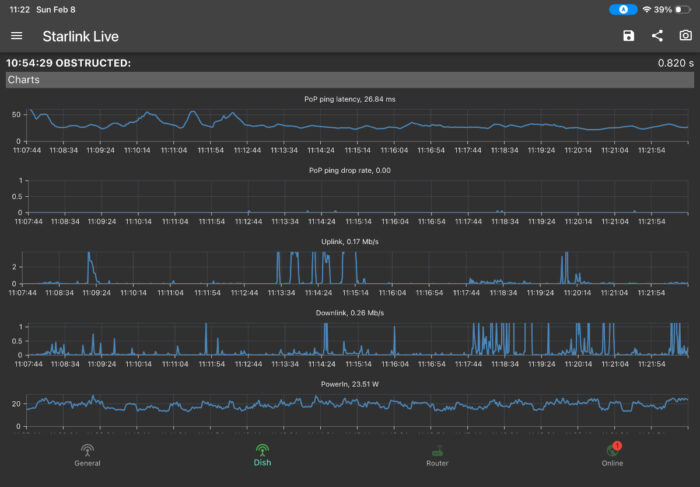
Some of the data available in the Star Debug app.
Anchors Aweigh: Final Thoughts
There you have it — Starlink on your boat is a game-changer, especially with the power-thrifty Mini leading the charge. Ditch the dial-up doldrums, wire it smart with Victron, keep tabs via Star Debug, and brace for the occasional weather- or motion-induced hiccup (because nothing’s perfect). Just remember: With great internet comes great responsibility — don’t blame me if you start working from the cockpit instead of fishing.
Do you have any Starlink hacks or experiences to share? Chime in in the comments below!


 Currents PDFs


Your explanation is excellent: reasons for everything and clear instructions for installing Starlink Mini. Thank you.
Thanks Nancy!
Nice work. One small point. In the old days when we circumnavigated predating even Inmarsat C only the good old SSB kept everyone out there in touch. Actually think party line: everyone on freq could listen in and jump in on a conversation. This gave rise to the Cruiser Nets. They were mostly on the Maritime Mobile channels, not Ham. Thus with our civilian radio licence we were good to go. Never did entertain becoming a Ham. Yes we did use Sailmail and before that we used Pinoak with a proprietary Pactor modem. Actually the man behind Pinoak went on to develop Sailmail, Jim Coreman
Not aware if there is a Net capability with the newer Sat Systems, certainly Inmarsat C was strictly one on one. Only reason we used it was because of the WX stuff and Notices to Mariners. Hugh Bacon. Now “On the Beach”.
There you can hold a cruiser net via Starlink using any of the common conferencing tools — Zoom, WhatsApp, etc. (after all, you’re on the internet!) I know there are a few nets held this way now, but they aren’t too common as the chats on WhatsApp, Facebook, etc. have almost completely replaced them now.
Hi, I assume there are still VHF nets for cruisers in anchorages or marinas. As to the offshore nets using Marine Mobile frequencies headed up by a Net person either land based or at sea such as the Coconut Net, to us they were the most useful communication links we had. A Sat Phone like Iridium was a great tool but only one on one. The Net often provided valuable sometimes life saving assistance during an offshore emergency like lost rudder or a dismasting where unexpected sources of help and advice could pop up literally out of the blue.
You mentioned nets on Starlink; are they as effective? It sounds like they might be. If so, do you see the Maritime Mobile freqs becoming totally disused. Hams are a special breed. I wonder if they have diminished in the face of Starlink. If we were just starting out offshore certainly we would equip with Starlink especially if a multi station use could be established ie a Net. Might even skip the SSB?
The chats (WhatsApp, Facebook, etc.) are increasingly replacing the VHF nets. Their convenience is undeniable, but there is a loss of community feeling. Many (most?) new cruisers are eschewing SSB and embracing Starlink as primary communications. I’ve seen complete SSBs left on cruiser ‘free tables’ in Panama, and many prior sat com systems like iridium go s sold off cheap as cruisers move to Starlink.
Great article, it helps clear up so many Starlink mysteries. The only thing I would add is:
1- consider a 12v -30 v converter adapter like the Daiertek cable with built in adapter for 12v cigarette lighter sockets. Unlike adding yet more “fixed blue boxes” to the boat, this is portable, reliable and after 6 months of using it I have nothing but praise for it. They are only $36 USD and come with a waterproof connector to the Starlink. So when I leave the boat, or go to a friend’s boat, camper trip, or even just a drive in the country, the Starlink mini could go too.
2- The other upgrade that is coming soon is a battery pack for the Starlink mini that is TFSA approved for air travel. This will enable it to be functional as an emergency communications device that is portable. It won’t replace EPIRBs etc., but it would be a welcome addition.