

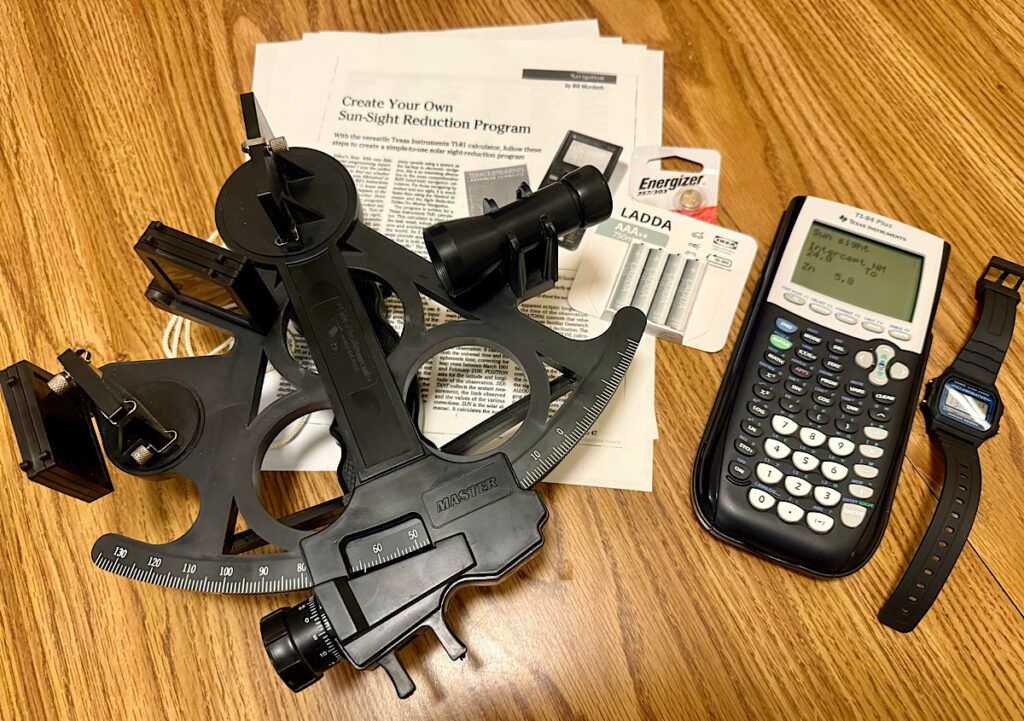
Celestial navigation has always carried a certain air of virtuous suffering. The Nautical Almanac, the sight reduction tables, the interpolation, and the quiet dread of dropping a sign somewhere between “GHA” and “intercept” have persuaded more than a few navigators that the sextant serves best as cabin decoration—preferably somewhere it can’t fall on your foot at 0300.
I have always liked celestial navigation. I also have enough self-awareness to know that liking something and being competent at it after several years of not doing it are quite different things. Celestial navigation is one of those skills that seems easy and perfectly obvious while you are practising it and strangely difficult and foreign when you pull the books out again years later.
Which is why I have become rather fond of an elderly graphing calculator.
A Short History of Letting the Calculator Do the Hard Part
In March 1996, Cruising World published a practical set of TI-81 programs for sun-sight reduction. Using Van Flandern-Pulkkinen solar formulas – as arranged by B. Emerson of Her Majesty’s Nautical Almanac Office – a genius named Murdoch shoehorned the process into a calculator with a laughably small storage capacity so that it worked. You can still find the original article here.
There were others: The Merlin II© was a celestial navigation computer system programmed into compact pocket calculators like the Sharp EL-512 that was sold during the 1980s and 1990s. It was designed for navigators to calculate sight reductions, sun, moon, and star sights rapidly. David Burch’s Starpath School of Navigation in Seattle still sells their TI-89 titanium based ‘StarPilot-89 Navigation Calculator’ (and it is a far, far more capable program) but it is pricey at ~$380 USD.
Those early programs proved the point: once the astronomical heavy lifting lives inside a calculator, the navigator’s life improves and the muttering decreases.
SUNSIGHT is my modern cheapskate’s take on the idea. Written independently for the plain TI-84 Plus, it uses Jean Meeus’ more modern and accurate medium-precision algorithms (Meeus’ medium precision Sun algorithms are accurate to a few arcseconds, far better than any sextant’s practical accuracy), a better ΔT model, improved refraction and parallax, and simple menus with better input error filters, none of which would have fitted comfortably into Murdoch’s tiny TI-81-constrained program. SUNSIGHT computes the Sun’s GHA and declination internally using Meeus’ algorithms, so no almanac or external tables are required.
I wish I could tell you it was an easy program to write, but my aged liberal arts degree and perfect lack of programming education were not conducive to a rapid development process, and the arcane nature of spherical trigonometry combined with TI’s idiosyncratic TI-BASIC language were tough to beat. The exercise would not have been possible (for me, at least) without access to the modern plethora of online tools and programming aids that are easily accessed, information from the internet, and AI assistance. The exercise left me even more in awe of Murdoch’s work, which was completed in isolation with books mail-ordered to his local library from the British Library. SUNSIGHT does not reproduce Murdoch’s TI-81 source code; it is an independent implementation using different astronomical calculations and a new program structure. Any errors are mine alone. All in all, the exercise was probably better for my brain than a few more Wordle puzzles, though.
You give the SUNSIGHT program the date, UTC time, assumed position, sextant altitude, limb, index error, pressure, temperature, and height of eye. It gives you intercept and azimuth—without requiring you to remember which column you were in.
The program is free, and available here.
And the best part? You don’t have to type it in by hand (the original Murdoch program had to be laboriously entered by hand, a 3 ½ hour exercise in tedium). Download it and transfer it to the calculator in a couple of minutes using the free ‘TI Connect CE’ software. That alone removes a major barrier for the rest of us who are not keen on entering hundreds of lines of code.
Why the TI-84 Plus?
The TI-84 Plus was chosen deliberately. It is widely available second-hand, cheap, rugged (enough) for boat life, and runs on ordinary AAA batteries for a very long time. It is technologically outdated by modern computing standards, but it remains heavily used in schools, because teachers know the TI-84 Plus series inside and out. Lesson plans, guidebooks, and curricula written decades ago are built around it. It has no Wi-Fi, no Bluetooth, no operating system updates to speak of, and no interest in phoning home. Once the program is loaded, it is a self-contained computational engine that does not depend on satellites, cellular networks, reference tables, or the boat’s electrical system. In an age when almost every other navigation tool is networked or rechargeable, that independence is a feature, not a limitation. This program was developed and tested only on the TI-84 Plus, so look for one of those.
Independent Failure Modes
This is the quiet strength of the system. The failure modes of a sextant, a quartz watch, and a battery-powered calculator are almost completely independent of the failure modes of GNSS, GPS, chart plotters, laptops, and phones. A software glitch, a flat house battery, or deliberate GPS disruption will not stop a sextant, a watch, and a SUNSIGHT-programmed TI-84 Plus from producing a usable line of position from a sun sight. That separation of failure modes is exactly what a backup is supposed to provide.
When the chart plotter starts showing positions that make no sense, or the GPS simply drops out, a method that never asks the satellites for anything becomes disproportionately valuable. This is not a replacement for the chart plotter. It is what you reach for when the electronics fail—lightning, total GPS loss, GPS jamming in a conflict-adjacent area, a blank blue screen in mid-ocean, or simply the desire for an independent check (or something to do on watch) on a passage.
Skills get rusty; a program that streamlines and reduces the procedural load is a practical answer for ordinary sailors who do not live in the almanac every day (and who would rather not discover just how badly their skills have faded in a rising sea).
Why This is Useful for Ordinary (Rusty) Sailors
Most of us do not practice celestial navigation every week. The procedures fade. The almanac feels foreign. Getting the annually-updated edition is a pain. Traditional sight reduction is powerful, but slow and unforgiving when you are out of practice. A simple arithmetic slip after a long absence can produce a confidently wrong answer, and there is nothing quite like the sinking feeling of realizing your carefully plotted fix puts you in the middle of the wrong ocean.
Here is a comparison of the times needed using the traditional method versus those of SUNSIGHT:
- Almanac look-ups & interpolation: 5–10+ minutes vs. None needed
- Corrections by hand: Several minutes vs. Built-in
- Sight reduction: 5–15 minutes vs. Instant
- Risk of arithmetic error: Real vs. Much lower
- Typical time after the sight 15–30+ minutes vs. 2–4 minutes
Because the time and effort to reduce the sights is so quick and easy, you can take and reduce multiple sights and toss out outliers.
The calculator does not make you a better navigator. It simply removes most of the places where rusty skills can produce friction, frustration, and wrong answers. For dummies like me, that is a genuine improvement.
Sun-run-Sun and the Useful Noon (or Near-Noon) Sight
A single sun sight gives you a line of position. Two or three sights taken a few hours apart and advanced for the distance run give you a running fix. This “Sun-run-Sun” method remains one of the easiest and most practical techniques available to a small-boat navigator. The sun is hard to misidentify (it is the really, really bright one in the sky), it is available for most of the day, and it requires no star identification skills or precomputation. It doesn’t fade in the dawn twilight, and the horizon under it is usually pretty solid all day.
Near noon, when the Sun’s azimuth is close to north or south, the resulting LOP lies roughly east-west and gives you a useful latitude check.
Earlier and later sights produce differently oriented (more north-south) LOPs, giving you a better crossing angle for the running fix.
Position comes from the running fix: the crossing of the advanced morning and afternoon (or advanced morning and noon) lines. Nothing exotic, just the classic Sun-run-Sun method, made faster and far less tedious by the calculator and far less likely to end in the creative exercise of your sailor’s vocabulary.
What You Need
- A sextant (a functional second-hand Davis plastic or antique EBBCO sextant is a perfectly serviceable, low-cost unit)
- A watch set to UTC (a classic Casio F-91W or the newer F-105W with the improved illuminator is ideal—cheap, accurate, and runs for ~10 years on a battery). You must establish a rate for the watch. (To rate a watch for celestial navigation, you measure how many seconds it gains or loses each day against an accurate time standard so you can correct it for use with your sights. Note when last synced to a known time source and what the error is per day when you store it so you can correct for it when you pull it out to use it in anger.)
- A SUNSIGHT-programmed TI-84 Plus
Step-by-step
1. Take the Sun sight. Note exact UTC time, Hs, limb, and index error.
2. Open SUNSIGHT.
3. Enter UTC date and time.
4. Enter assumed latitude and longitude (your DR position).
5. Enter sextant altitude (Hs), limb, index error, height of eye, temperature and pressure.
6. Read intercept (toward/away) and azimuth (Zn).
7. Plot the line of position.
Repeat later, advance the earlier sight for the distance run, and you have a Sun-run-Sun running fix. The process takes longer to describe than to do.
Acquiring the Kit
Used TI-84 Plus calculators turn up regularly on Facebook Marketplace, school surplus sales, and online classifieds. Look for working keys, make sure the device has never suffered leaking batteries or severe impact damage, and confirm that it has a clear, readable screen: cosmetic perfection is optional. The calculator does not care if it looks like it survived high school. Even new, they’re relatively inexpensive. They are widely available new and are often on sale in back-to-school seasonal sales.
The same places are good sources for inexpensive plastic sextants. Check that they work smoothly, have intact mirrors and shades, and no obvious signs of having been dropped or otherwise abused.
Batteries: Prefer non-rechargeable lithium cells (Energizer Ultimate Lithium or similar) or low-self-discharge NiMH (IKEA Ladda or Eneloop-style) over alkaline cells. Ordinary alkaline batteries are a classic source of spontaneous chemistry experiments that lead to corroded battery compartments and subsequent sadness.
Storage: Keep the calculator and watch in a Ziploc bag in a sealed box or dry bag with spare batteries and desiccant. For extra protection, wrap it in a couple of layers of aluminum foil or place it inside a metal tin, creating a simple Faraday cage. Store it away from the boat’s main lightning paths. Power it up occasionally to confirm the program is still there and that you still remember which button does what. Replace or recharge the batteries every year or two (do the 4 AAAs separately from the silver-oxide cell so you don’t inadvertently clear the program from memory). Write the service dates on a bit of masking tape on the package.
The Bottom Line
Traditional celestial navigation is a fine skill. It is also easy to let slide, and the paper-based methods punish rust with relentless efficiency. Murdoch’s 1996 Cruising World calculator approach —and SUNSIGHT, which revisits the same idea with an independent modern implementation — offer a low-cost, low-friction way to keep the capability alive.
The TI-84 Plus was chosen because it is cheap, widely available, long-lived on readily available batteries, and independent of networked systems that can all fail together. Its failure modes do not overlap with those of GPS or the boat’s other electronics. In an era when satellite navigation is increasingly subject to jamming and disruption, that independence has practical value.
Download the program from GitHub, load it onto a second-hand TI-84 Plus via the free ‘TI Connect CE’ software, team it with a cheap Casio watch and a plastic sextant, and you have a self-contained backup that does not require the Nautical Almanac.
It will not make you infallible. It will not impress the crowd at the yacht club bar. It will, however, let a rusty navigator produce a usable Sun line of position in a few minutes instead of half an hour of careful (or not-so-careful) arithmetic. Maybe without cursing (much).
For dummies like me, that is worth having in the nav drawer.
Disclaimer:
This software is an educational and backup navigation tool, not a substitute for experience, education, judgment or common sense. While I have tested it extensively against the U.S. Naval Observatory’s Celestial Navigation Data for Assumed Position and Time and other authoritative sources, and it generally behaves itself and delivers accurate results, I cannot guarantee perfection (just ask Debra). A correct calculation will not save you from bad sights, a watch that has wandered off UTC, a rubbish DR, or classic “I typed 52° instead of 25°”-type errors. “Garbage in, garbage out” remains undefeated. Test it yourself. Keep and use other independent means of finding out where you are. And remember: this program will not make you taller or better looking, alleviate hangover symptoms, or prevent you from hitting something solid if you ignore the results. Use at your own risk, preferably while (reasonably) sober.


 Currents PDFs


Marvelous–with all the humour attached.
One reason I didn’t figure out where we were was because the whole system was too complex, even though I learned how to do it.
Thanks Nancy!
Bravo! A great article, Rob! Celestial navigation is FUN, and by reducing the math burden it becomes a more approachable topic for many folks.
For those who don’t have a TI-84 but still want to try a calculator-assisted sun sight, I have a spreadsheet that allows using a laptop or similar device. Written as a LibreOffice Calc spreadsheet, it should also work fine in OpenOffice or MS Excel. I’ve used it successfully since 2005, and recently updated it to include two additional methods of determining the sun’s GHA and Declination. The spreadsheet is available at https://github.com/BjarneBitscrambler/SunSight_Spreadsheet
Nice job, Bjarne! Particularly when you’re starting out in celnav anything that can help you skip the drudge of lookups and worksheets is worthwhile.